

Culinary: recipes, menus, and nutrition
The Culinary section is where the food itself lives. Enter an ingredient once and it carries through recipes, menus, production, ordering, cost, and clinical checks — allergens and diet flags roll up automatically at every step, so what's published always reflects what's actually in the pan.
Ingredients
Culinary → Ingredients is your organization's ingredient library. Each ingredient carries:
- A base unit, cost per unit, and density (so recipes can convert between weight and volume).
- Allergens — the big-9-plus set (milk, eggs, fish, shellfish, tree nuts, peanuts, wheat, soy, sesame, and more).
- Diet flags — vegetarian, vegan, gluten-free, halal, kosher, low-sodium, and the rest.
- Nutrition per 100 g/ml.
Enter nutrition by hand, or press ✨ Estimate with AI to fill a draft — AI estimates are always labeled as estimates and flagged for dietitian review before anything customer-facing relies on them.
Recipes
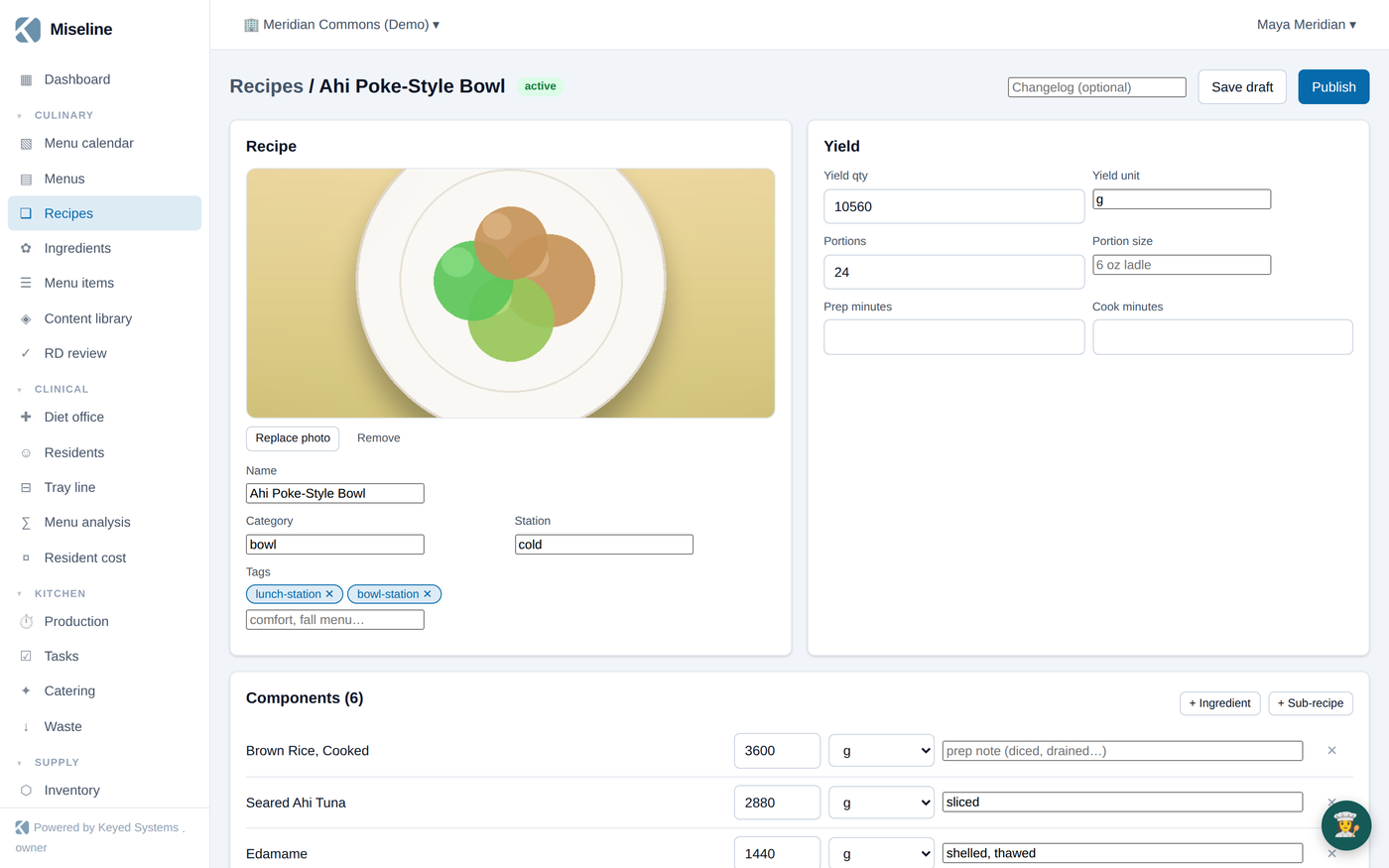
Culinary → Recipes holds versioned recipes. Create one with + New recipe, bring a spreadsheet in with ⇪ Import CSV, or point ✨ Import with AI at a photo, PDF, or pasted text and get a structured draft to review.
A recipe version includes:
- Yield and portion size.
- Components — ingredients or other recipes (sub-recipes are fine), with quantities.
- Method steps — each can carry a station, time, equipment, and CCP temperature checks for HACCP.
- Texture and diet variants — IDDSI texture levels, mechanical soft, puree, and diet substitutions, so one recipe serves the whole census.
Publishing a version computes and freezes its cost per portion, nutrition per portion, and allergen roll-up from the components at that moment. Published versions are immutable — edit by drafting the next version, so you always know exactly what was served when. The recipe page also renders an FDA-style Nutrition Facts panel you can print.
Recipes and menu items can carry a plate photo — it follows the dish onto boards, batch cards, and the diner app.
Menu items
A menu item (Culinary → Menu items) is a dish dressed for service: a recipe (or a standalone item) plus a category, serving description, photo, and — if you charge — a price. Menu items are what appear on menus, boards, the register, and the diner app.
Menus, cycles, and the calendar
Culinary → Menus builds daily, cycle, static, and catering menus. A menu is a grid of slots: day (or date) × day part × station, each slot holding a menu item with optional alternates and texture variants — the alternates are what the tray line and dining room fall back to when a diner's diet conflicts with the primary dish.
Culinary → Menu calendar assigns a cycle menu to a site's calendar: pick the anchor date and the rotation repeats from there. From that moment the platform always knows the effective menu for any site and date — production planning, tray generation, order lists, menu boards, and nutrition analysis all read from it. Change the assignment and everything downstream follows.
RD review and signoff
Menus follow a review workflow built for programs where a dietitian signs the menu:
- A menu starts as a draft.
- Sending it for review freezes a snapshot and moves it to pending review.
- A member with the RD credential approves or rejects it — the decision is recorded permanently, with the reviewer and the exact content reviewed.
- Approved menus publish; editing an approved menu re-opens review.
The Culinary → RD review queue collects everything waiting on a dietitian in one place. Signoff authority follows the RD credential on a person's membership, not their rank — see Administration.
Nutrition targets and menu analysis
For programs feeding a defined population, set population nutrition targets (DRI-based presets you can adjust, or fully custom bands). Attach a target to a menu or set a site default, and the menu's nutrition check shows where the effective menu lands against each band. Clinical programs get deeper analysis — see Clinical dining.
The content library
Culinary → Content library offers curated recipe and cycle-menu packs — senior-living classics, hospital therapeutic, campus fresh, corporate café — that install into your organization with one click. Installation clones everything as your own editable records (ingredients matched by name, recipes with versions, cycle menus with slots), tagged with allergens, diet flags, and IDDSI textures. Installing a pack twice never duplicates: existing names are skipped.
Where the culinary data flows
| You maintain | It powers |
|---|---|
| Ingredient costs | Recipe cost per portion, cost intelligence, catering quotes |
| Allergens and diet flags | Tray-line conflict checks, tableside order warnings, board icons, menu compliance |
| Recipes and yields | Production runs and batch scaling, prep labels, order lists |
| The effective menu | Boards, tray line, ordering, the diner app, nutrition analysis |
Tips
- Keep recipe component units canonical (the units the ingredient's base unit understands) — conversions stay exact and cost math stays honest.
- Sub-recipes are supported, but keep production recipes shallow — deeply nested sub-recipes make theoretical usage harder to attribute.
- Publish recipes before you lean on costing: cost-per-portion comes from the published roll-up, and unpriced components are flagged rather than guessed.