

Clinical dining: the diet office
The Clinical section is a working diet office for senior living, hospitals, and long-term care: the census, the diet orders, a tray line that checks every item against every order deterministically, and the intake documentation that closes the loop. Clinical dining is available on Pro and Enterprise plans.
Census
Clinical → Residents holds the census per site: residents or patients with unit and room, and a status of active, discharged, or on leave. Bring an existing roster in via CSV import, maintain it by hand, or let your EHR drive it over an HL7 ADT feed — admissions, transfers, discharges, and updates apply automatically, with every message kept in an audit log.
Diet orders
Diet orders are kept kardex style: writing a new order supersedes the previous one, and the full history stays on the chart. An order captures the therapeutic diet, IDDSI texture level and fluid consistency, allergies, restrictions, portion size, adaptive equipment, supplements, feeding assistance, and NPO (with an until-time).
Type the order as free text and press ✨ Parse with AI to get a structured draft with confidence and warnings — a dietitian verifies the parsed order before the platform trusts it. No AI configured? Enter the fields directly; the workflow is identical.
The tray line
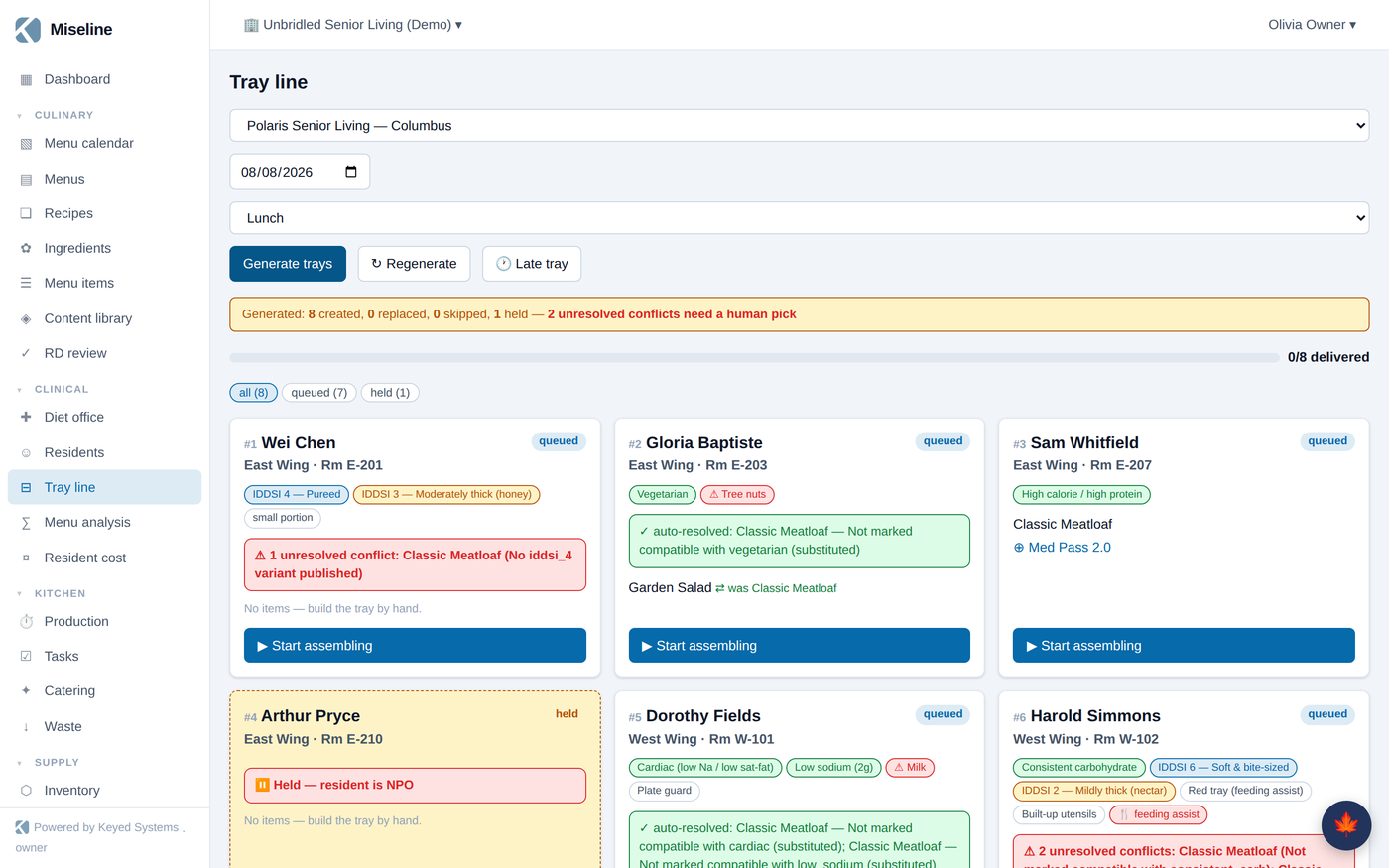
Clinical → Tray line turns the day's effective menu and the active diet orders into tray tickets. Press Generate trays for a date, meal, and site:
- Every item on every tray is checked against that resident's order with deterministic conflict rules — allergen, diet, texture, and NPO. The same rules run everywhere in the platform, so the tray line, the order pad, and the menu planner never disagree.
- Conflicting items are substituted automatically from the menu's alternates when a compliant option exists; unresolved conflicts are flagged for a human.
- Tickets move through assembling → checked → delivered; late trays can be added ad hoc.
- A tray-line board face shows the queue on a wall screen for the line.
Intake, weights, and nutrition risk
Point-of-care staff record meal intake — percent eaten, fluids, refusals — per resident per meal, from the web or the staff app (offline-safe, syncs when the connection returns). Weights are tracked alongside. The nutrition-risk dashboard watches three-day intake, refusals, and roughly thirty-day weight change, and surfaces the residents a dietitian should see first.
Population nutrition and menu analysis
Clinical → Menu analysis compares the effective menu against population nutrition targets — DRI-based presets you can adjust, or custom bands — showing where each nutrient band lands day by day, plus a diet-coverage check: does every therapeutic diet in the population have a compliant option in every meal? Attach targets to a menu or set a site default. The findings feed the RD review workflow in Culinary.
Per-resident food cost
Clinical → Resident cost computes raw food cost per resident day — the budget KPI clinical programs report on. It mirrors the tray line's selection logic (primary item, or the substituted alternate) and sums recipe cost per portion for what would actually be served, by day, by unit, and by resident, with uncosted items called out rather than guessed. The number is only as good as your menu-item diet tagging and published recipe costs — the page flags what it can't cost.
Where the clinical data flows
| You maintain | It powers |
|---|---|
| The census and diet orders | Tray generation, order-pad warnings in the dining room, resident cost |
| Menu alternates and diet flags | Automatic substitutions instead of flagged conflicts |
| Intake and weights | The nutrition-risk dashboard |
| Published recipe costs | Per-resident food cost |
Tips
- Give every menu slot an alternate that satisfies your common therapeutic diets — the tray line resolves conflicts silently instead of queueing them for a person.
- Verify AI-parsed orders promptly; unverified orders are visible but flagged, and verification is what makes them chartable.
- If you connect an ADT feed, keep MRNs consistent — residents are matched by site and MRN.