

Tags, scanning, and audit trails
Every piece of equipment and every space in Miseline carries a tag code. Print it as a circular QR label, stick it on the walk-in door, and anyone standing in front of it — line staff, an auditor, a manager — can scan it with a bare phone camera and act right there: complete the task, log the temp, capture the observation, report the issue. No app install required.
Printing tag sheets
Equipment → Assets → Tag sheets builds printable label sheets:
- Pick a site, then choose the equipment and spaces to print (search and check off; select all or none in one click). Anything scannable is listed — spaces get tag codes too, so dining rooms, walk-ins, and storage areas are all taggable.
- Choose a label size — 2-inch or 1.5-inch rounds, laid out for standard round die-cut label stock.
- Print straight from the browser. Each circular label carries a brand-color ring, the QR code, and the target's name and tag code. The QR uses high error correction, so the round crop doesn't hurt scanning.
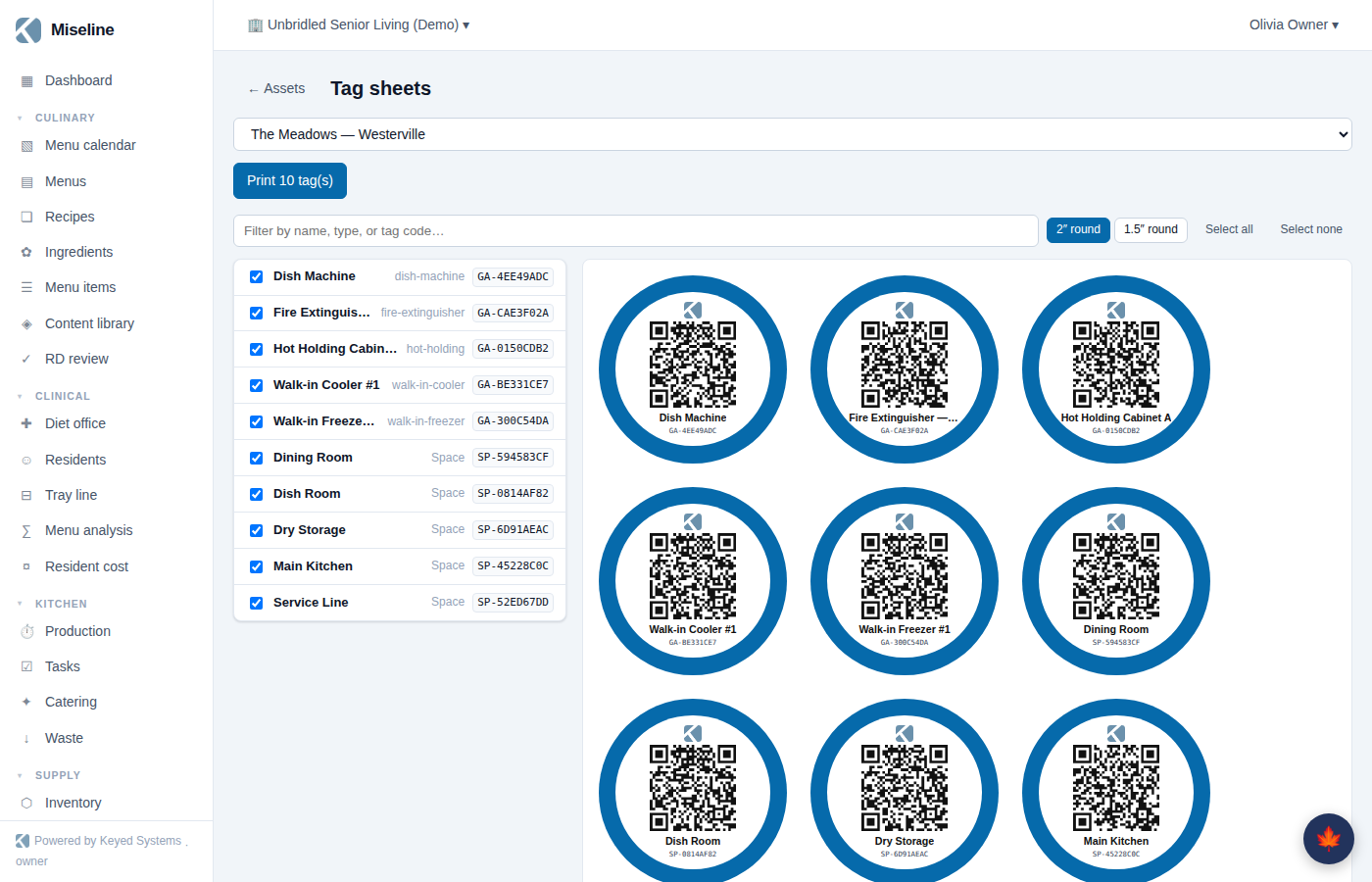
Each QR encodes a link to that tag's scan page — a plain web URL, so any phone camera opens it.
Scanning a tag
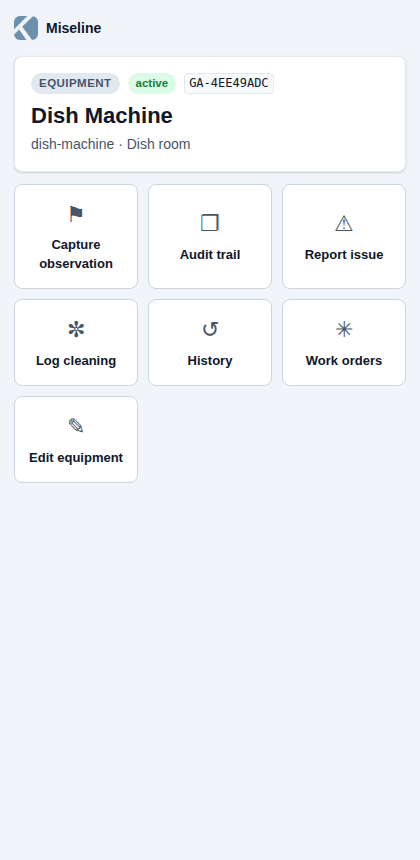
Scans land on the scan page — a fast, mobile-first surface outside the main app shell:
- Signed out? You're taken to sign-in first, and the scan target is preserved — after signing in you land on the exact tag you scanned.
- Signed in with a different active organization? If the tag isn't recognized in your current organization, the page offers your other organizations one tap away.
- The tag itself grants nothing: resolving it requires a signed-in member of the organization that owns it.
The page shows the target — name, type, status, tag code — with live temperature readings when sensors are bound to it (out-of-range readings are flagged), then a grid of actions.
What each role sees
The action grid is role-aware — everyone gets a scan page, but the verbs match what they're allowed to do:
| Action | Who sees it |
|---|---|
| Capture observation | Staff who conduct inspections — opens observation capture pre-scoped to this target, with conditions suggested for its type |
| Audit trail | Anyone with report access |
| Tasks | Staff who complete tasks, when open tasks exist for the target (space scans include tasks on equipment in the space) |
| Log temp | Staff who log temps, when sensors are bound |
| Report issue | Every member — opens a work order, stamped with the tag reference |
| Log cleaning | Equipment managers (equipment only) |
| History | Anyone (equipment only) — recent events and readings |
| Work orders | Managers |
| Edit equipment / Edit space | Equipment and site managers |
Audit-capable users additionally get audit context on the scan: recent observation captures on the target, open findings, and a 90-day pass/fail evidence summary.
Audit trails on equipment and spaces
Everything captured against a tagged target accumulates into its audit trail:
- On an equipment record (Equipment → Assets, open the detail), the Audit trail tab.
- On a space (Equipment → Spaces & map), the per-space audit trail.
- On the scan page itself, the Audit trail action.
The trail shows the target's observation captures — each marked observed or checked clear — the findings they raised with severity and review status, and the 90-day evidence summary. It's the "what's the story on this walk-in?" answer, one scan away.
Tips
- Tag spaces as well as equipment — a dining-room or dry-storage tag gives surveyors-in-training somewhere to file what they see, and gives the space its own evidence history.
- Reprint a site's sheet after adding equipment; printing is cheap and the picker makes partial sheets easy.
- Put the tag where the phone naturally points — door handles and control panels beat the back of the unit.