

Production, tasks, and kitchen boards
The Kitchen section runs the day: what to cook, how much, who's doing what, and a live board on the wall so nobody has to ask. Everything here is built for wet hands — big targets, offline-tolerant mobile check-off, and screens that update themselves.
Forecasts and generating the day
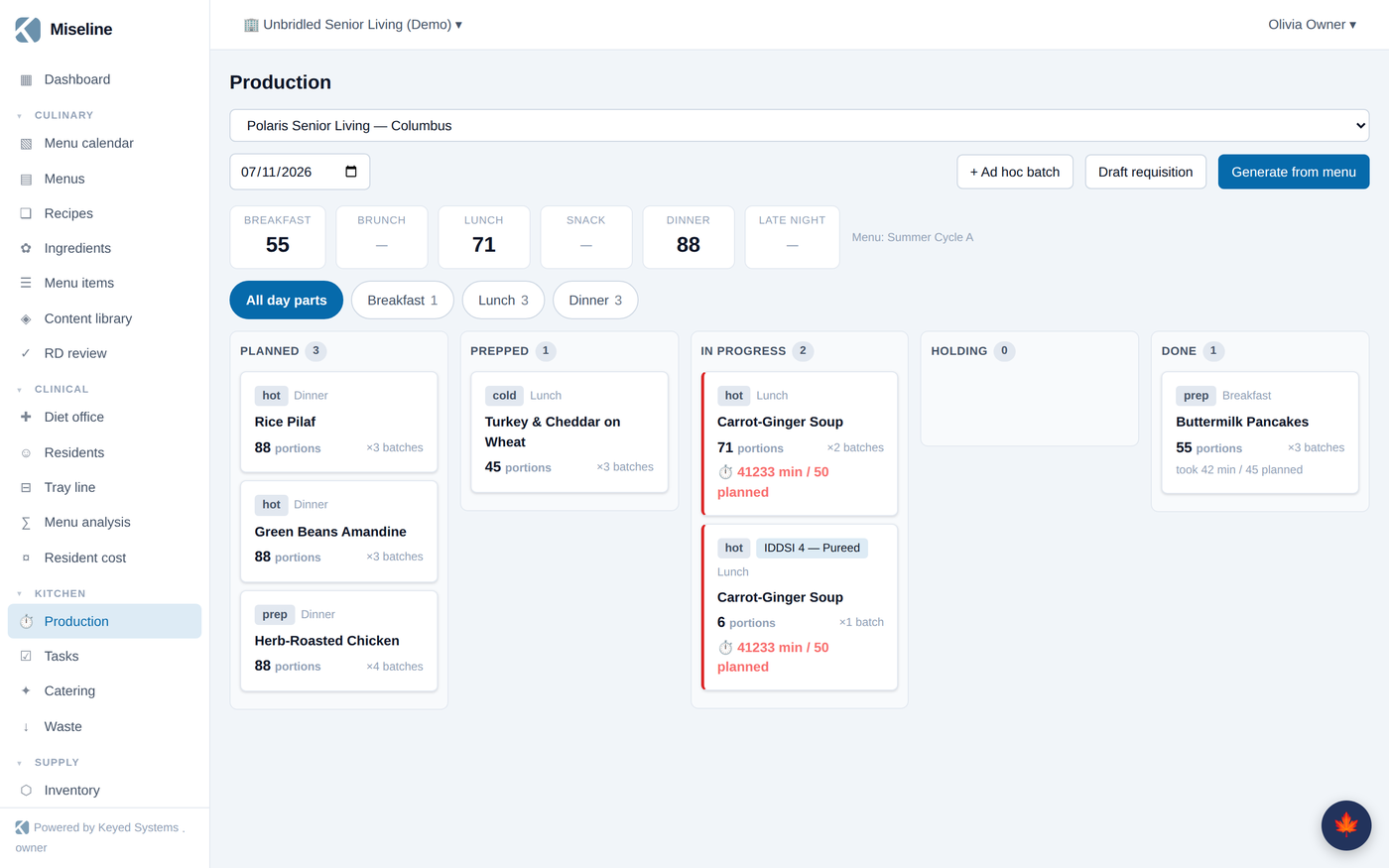
Kitchen → Production starts from covers: forecast how many you'll serve per site, date, and day part (tap the forecast to edit it). Live captured demand — tableside orders already taken — sets a floor, so the plan never dips below what's actually been ordered.
Press Generate from menu and Miseline explodes the day's effective menu into production runs, batch-scaled from each recipe's yield to the forecast. No menu assigned for that date? The page tells you and links you to the menu calendar. Need something off-plan? + Ad hoc batch adds a run without a menu slot.
Running the line
Each run is a card that moves through the day: planned → prepped → in progress → holding → done, with planned-versus-actual time tracked as it goes. From a run's batch card the team can:
- Log temp — CCP temperature checks recorded against the run.
- Add note — anything worth remembering ("86'd the garnish, subbed parsley").
- 🖨 Print labels — prep, use-by, and allergen labels, batch-generated with a QR code linking back to the run.
- → Hand off to station — pass the batch downstream with a note; handoffs show on the wallboard.
Completed runs post their theoretical ingredient consumption for cost variance, and Draft requisition turns a day's runs into an ingredient needs-versus-stock request for the storeroom in one click.
Tasks and routines
Kitchen → Tasks is the working task board:
- Routines — recurring definitions (opening, closing, cleaning, maintenance, service) that materialize into dated tasks automatically.
- Tasks can also come from a manager, a huddle action, an audit finding, or a sensor alert — one board, whatever the source.
- Tasks can require verification evidence: a QR scan, a photo, a temperature, a note.
- A task can carry attached photos and linked guides (SOPs from your document library), and can be reassigned to a person or a position.
On the staff app, "my tasks now" is the home screen, and completions sync even when the walk-in has no signal.
Boards on the wall
Equipment → Boards & devices (admins) pairs any screen in a browser: create the device, get a six-character code, type it on the screen, done. Board kinds include:
- Kitchen wallboard — today's production with live status and timers, station filter, temp alerts, huddle brief, handoffs, and the 86 rail.
- Menu board — the published menu for the day part, with allergen and diet icons, themed in your brand colors, with rotation for multi-screen lineups.
- Tray line, site map, station, and kiosk faces for clinical and larger operations.
Boards update in real time — a change in the kitchen shows on the glass without anyone touching the screen — and fall back gracefully to polling if the connection is flaky.
Cast pushes content to a specific screen on demand: send a recipe's method steps to the line's wallboard for training, or a notice to every screen in the building. Device counts meter against your plan; boards authenticate with their own device token, never a person's login.
Alerts
Missed tasks, temperature excursions, offline sensors, and expiring lots raise alerts with acknowledge/resolve tracking — they show on wallboards, in the app, and can escalate to SMS on plans that include it. Alerts can spawn corrective tasks so the fix lands on the same board as the rest of the day. See equipment and sensors coverage in the admin guide for pairing sensor gateways.
Tips
- Assign cycle menus on the calendar first — production generation, order lists, and boards all read the effective menu.
- Keep recipe yields accurate; batch scaling and requisition math both come straight from them.
- Give every station a wallboard filter — a station-scoped board is the difference between glancing and hunting.