

Getting started with Miseline
Miseline is an operational-excellence platform for foodservice teams — senior living, hospitals, colleges and universities, K-12, corporate dining, restaurant groups, commissaries, and caterers. This guide takes you from a new account to a working kitchen: sites, a published menu, your team, and a board on the wall.
Create your account
- Click Start free trial on the Miseline home page (or go straight to the sign-up page).
- Enter your name, work email, a password, and your organization's name.
- Pick the plan you expect to need and your industry — you can change both later.
Every new organization starts on a 30-day Pro trial — no credit card required. When the trial ends you choose a plan from Insights → Billing & plan; nothing is deleted if you need more time to decide.
Already invited by a teammate? You don't need to sign up — your administrator creates your account and Miseline emails you a temporary password. Sign in and change it from Settings.
The guided setup
On first sign-in you land in the setup wizard (you can return to it any time at Setup while onboarding is in progress). It tracks real progress — each step is checked off automatically when the underlying thing exists, in whatever order you do it:
| Step | What it does |
|---|---|
| Create your first site | A site is one kitchen, café, or venue. Everything else — menus, production, boards — hangs off a site. |
| Apply the starter pack for your vertical | One click seeds compliance frameworks, policy templates, and audit templates matched to your industry. |
| Set your brand colors | Optional. Your primary and accent colors theme menu boards and diner-facing screens. |
| Add your first menu item | A menu item is a dish as diners see it — name, category, image, price if you charge. |
| Publish a menu | Menus collect items into day parts and stations; publishing makes them live for boards and the kitchen. |
| Invite a teammate | Add staff from Settings; each person gets a role that controls what they can see and do. |
| Meal plan or nutrition targets | Campus and corporate programs create a meal plan; clinical programs set population nutrition targets. |
| Pair a kitchen board or device | Optional. Put today's production or the menu on any screen with a six-character pairing code. |
| Mint a diner join code | Optional. Diners use a site's join code to connect the diner app to your program. |
| Confirm your plan | Optional during trial. Review usage and pick the plan that fits. |
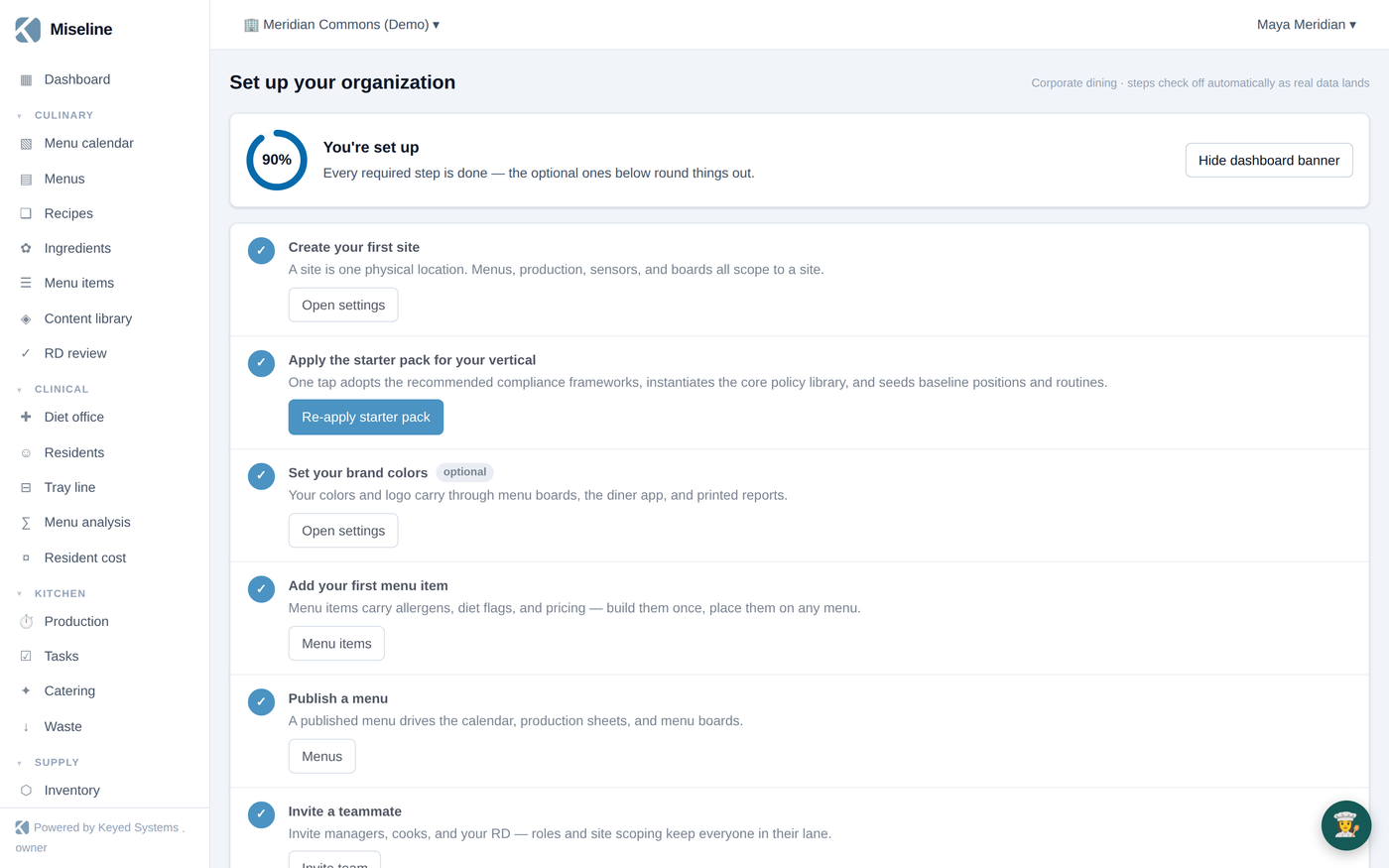
The steps adapt to your industry: senior-living and hospital programs are asked for population nutrition targets, campus and corporate programs for a meal plan.
Finding your way around
The left navigation is grouped by area of work. Sections collapse — click a heading to fold it away; the section holding your current page always stays open.
- Culinary — ingredients, recipes, menu items, menus, the menu calendar, the content library, and RD review.
- Clinical — diet office, residents, tray line, menu analysis, resident cost (for programs that serve clinical populations).
- Kitchen — production, tasks, catering, waste.
- Supply — inventory, counts, purchasing, order lists.
- Team — schedule, huddles, dining engagement.
- Front of house — dining room, meal plans, register (POS).
- Compliance — frameworks, survey readiness, policies, records, templates, inspections, actions.
- Review — the external review and maturity program.
- Equipment — assets, work orders, sensors, spaces and map, boards and devices.
- Insights — reports, analytics, cost intelligence, marketing, sustainability, billing, settings.
What you see depends on your role — line staff typically see the day's work (tasks, production, temps), while managers and admins see the full picture. See Roles and permissions for the details.
A sensible first week
- Publish the food. Load your recipes (type them, import from a photo or PDF, or install a pack from the Content library), dress them as menu items, build a menu, publish it. See Culinary.
- Put it on the calendar. Assign a cycle menu to each site so the platform always knows today's effective menu — production, tray line, boards, and ordering all read from it.
- Bring in the team. Invite managers and staff with the right roles; site-scope people who only work one location.
- Turn on the day. Create routine task lists (opening, closing, cleaning), pair a wallboard, and let production runs generate from the menu and forecast. See Production and boards.
- Layer in your modules. Clinical census and tray line, inventory and ordering, compliance frameworks, catering — each module works on the same data you just entered, so nothing is re-keyed.
The mobile apps
Two companion apps extend the platform:
- The staff app — tasks, production check-off, temperature logs, huddle recording, and audit capture, built to work offline and sync when the connection returns.
- The diner app — menus, meal selection, feedback, and rewards for the people you serve. Diners connect with a site join code.
Getting help
- Every module has a guide in these docs — start with the module guides.
- Working with the API? See the API reference.
- Stuck? Reach us from the support page.